
Sentinel 2.3.0: faster scans for my Statamic security addon
My Statamic security addon, Sentinel, has reached version 2.3.0. This release is mostly about two things: scans that do less work to reach the same answer, and report emails that are easier to read, especially on a phone.
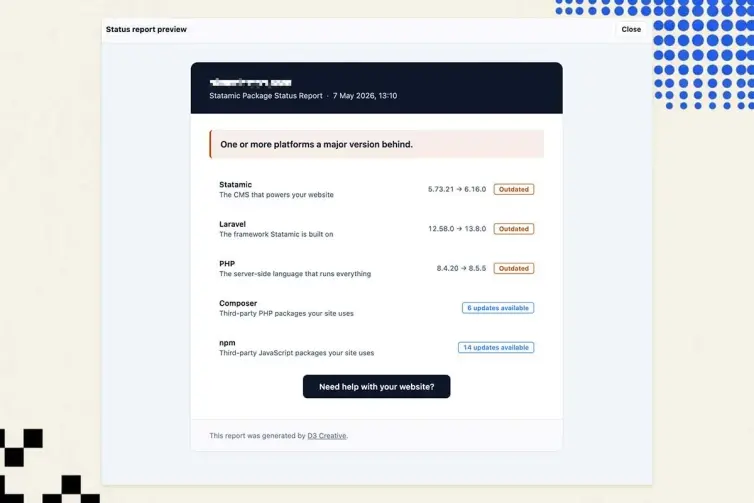
If you haven't come across it, Sentinel checks the software your Statamic site is built from. It compares your installed versions against Packagist, the npm registry and the Open Source Vulnerabilities (OSV) database, then shows what is outdated or unsafe inside the Statamic Control Panel (CP).
What makes the Statamic security addon faster
A scan talks to several outside services. Every request takes time, so the quickest way to speed things up was to stop asking for things Sentinel already had, or never needed.
Vulnerability details are cached between scans. Sentinel keeps a short summary of each security advisory and only fetches it again when OSV says it is new or has changed. On a test site that was well behind on updates, a repeat scan dropped from 270 requests to 41, and from about 6 seconds to under 4.
Smaller downloads. Every registry request now asks for a compressed response. Packagist's feed for Laravel shrinks from about 1 MB to 100 KB.
No duplicate requests. The Statamic and Laravel version feeds are downloaded once per scan instead of twice.
Fewer pointless lookups. Statamic marketplace security checks now only run for Statamic itself and its addons. Before, Sentinel asked about every outdated package, most of which were never going to be on the marketplace.
No more giant downloads for large npm packages. To see when a release was published, Sentinel used to fetch each package's full history. For Vite that is around 39 MB, and it often timed out. It now reads the date from a much smaller file it was already downloading.
There is one more speed fix outside the scan itself. The Notify feature used to check for scheduled emails while each Control Panel page was loading, so a page could hang while an email sent. That check now runs after the page has been delivered.
You can also let scans run on their own now. Set SENTINEL_SCAN_SCHEDULE to daily, weekly or a cron expression, and Laravel's scheduler handles the rest. It is off by default.
SENTINEL_SCAN_SCHEDULE=dailyReport emails that read like a message
The status email used to open with a coloured box saying "Your Statamic website needs attention". That told you nothing about what was wrong. It now opens in plain text with the actual situation:
Hi, your Statamic installation is running version 5.73.2. The latest version is 6.33.0. That's 84 versions behind.
Underneath sits a short "Did you know?" note. It explains that a website is several pieces of software (Statamic, Laravel, PHP and lots of smaller packages), each with its own updates. Most clients have never had that explained to them, and it makes the rest of the email make sense.
The rest of the layout got calmer too:
Status labels sit under each description instead of in a narrow right-hand column that squeezed the text onto several lines.
Statamic, Laravel and PHP show their version beside the title, with "Major version behind" always first.
When a package list has security issues, that is the label you see. It no longer sits beside an "updates available" count that looked like it contradicted it.
Text is a size larger, and a thin line separates each row.
Preview emails on desktop or phone
Most people read these emails on their phone, and on narrow screens the old layout clipped the right edge of the text. That is fixed. More usefully, you no longer need to send yourself a test email to check.
Every email preview in Sentinel now has a Desktop / Phone toggle. That covers the status, update and Plan Summary reports, anything already sent, and the Notify emails. Phone switches the preview to a 375 pixel width, so you see the layout exactly as a phone would show it.
You no longer need to send yourself a test email to see how a report looks on a phone.
Plus a long list of fixes
This release also closes several security gaps in the addon itself, and fixes saved data on older Laravel 8 sites. Nested npm packages are now checked for vulnerabilities too. When the vulnerability database is down, the scan reports a failed check instead of a clean site. The full list is in the changelog. To update, run:
composer update d3creative/statamic-sentinelSentinel shows you what needs doing. If you would rather someone else did it, that is what my website maintenance plan is for. I run the updates, test the site and send you the report.

You might also like...
- PHP2Shell is patched on every site I maintain
- Critical PHP Security Update Incoming
- Statamic Sentinel 3.0
- Statamic 5 security countdown: fixes stop in December 2026
- Darkroom: a Statamic AI image generator for Nano Banana
- Tracer 2.0: my Statamic UTM builder gets site-wide settings
- Statamic 6 security depends on keeping up with releases
- Warming Statamic static cache behind basic auth
- Over 250 installs on: Sentinel and CMS security for Statamic
- Statamic background recache smooths out bulk cache invalidations