
Darkroom: a Statamic AI image generator for Nano Banana

My Statamic AI image generator, Darkroom, is out. It runs Google's Nano Banana image models inside the Statamic Control Panel (CP) and saves the images you keep straight into your asset library, named, with alt text, in the folder you choose. It uses your own Google key, so there is no new subscription to manage.
It's free, MIT licensed and installs with Composer. The rest of this post covers why I built it, what it does and what the images cost.
Why I built it
Nano Banana is Google's name for its Gemini image models. I use it for the image at the top of each blog post, which doubles as the card when I share the post on social media. Nothing elaborate: a saved house style, plus a prompt about whatever the post covers.
There's no shortage of wrapper services that put a nice UI over an API call, but that's one more monthly subscription on an ever growing list of services I subscribe to. I usually use Google AI Studio directly. It works, but it feels a bit slow, and its history is hard to find your way back through. It lacks the nice UI.
Google AI Studio feels like a demo of the models, not a tool built for doing the same job every week.
Every image I wanted to save went to my Downloads folder, I had to rename by hand (like a caveman), and had to be uploaded to the right asset folder once I had logged in to Statamic.
The image was always going to end up in Statamic, so I moved the whole job into the CP. I suspect other Statamic users making the odd thumbnail will want the same.
From prompt to asset on one page
Darkroom adds a page under Tools > Addons in the CP. You write a prompt, pick a model, aspect ratio and quality, and the estimated cost is shown next to the Generate button before you spend anything. One prompt can return up to four images.
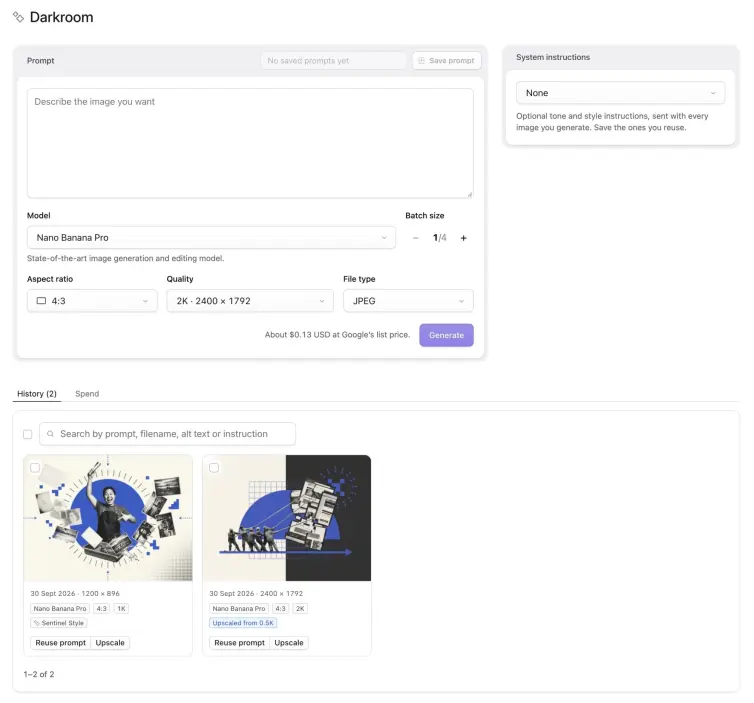
Generate images with Google's Nano Banana models from the Statamic Control Panel and save them straight into your asset library.
You can set reusable house styles in a system instruction: tone and style notes sent with every image. Mark one as the default and it's selected whenever the page loads. Prompts can be saved too, along with their settings and destination folder. Both are stored as YAML in resources/addons/statamic-darkroom/, so they can be committed with the rest of your site.
Each image comes back as a preview. You give it a filename, which is made URL-safe as you type, and Write asks one of Google's text models to draft the alt text from the image and its prompt. Save to folder then opens Statamic's own asset browser, so choosing or creating a folder works as it does everywhere else in the CP. Nothing reaches your asset library until you save it.
Saving goes through Statamic's normal upload path. Filenames that are already taken get a suffix instead of being overwritten, and Glide presets (the resized versions your templates ask for) are generated ahead of time. A JPEG is stored exactly as Google returned it, with no re-compression.
The History tab lists every image Darkroom has saved, and Reuse prompt puts its prompt and settings back into the form. That history isn't a separate log. It's stored in each asset's own metadata, so it follows your assets wherever they're synced, and deleting an asset removes it from the list.
What the images cost
Darkroom is free. Google's image models have no free tier through the application programming interface (API), so your key needs a Google Cloud project with billing turned on. Google bills per image, in US dollars.
Google's prices per image, as of 30 September 2026,
a 1K image from Nano Banana 2 costs $0.0672
and a 2K image from Nano Banana Pro costs $0.134.
Nano Banana 2 Lite is the cheapest at $0.0336, though it only produces 1K images.
The Spend tab keeps an estimated monthly total, broken down by model, with every image behind it. Your Google invoice is still the real figure.
Installing Darkroom
Darkroom needs Statamic 6 and PHP 8.3 or later. Install it with Composer:
composer require d3creative/statamic-darkroomThen add your Gemini API key to .env:
GEMINI_API_KEY=your-key-hereThe key is only read on the server and never sent to the browser. Super users can use Darkroom straight away. Anyone else needs the Generate images with Darkroom permission, and permission to upload to at least one asset container. Generating from a reference image isn't supported yet, apart from upscaling.
The full documentation is in the README on GitHub, and bugs and questions go to GitHub Issues. Darkroom sits alongside my other Statamic addons, Sentinel and Tracer. If you'd rather someone else kept your Statamic site updated and tested, that's part of my monthly website maintenance.

You might also like...
- PHP2Shell is patched on every site I maintain
- Critical PHP Security Update Incoming
- Statamic Sentinel 3.0
- Statamic 5 security countdown: fixes stop in December 2026
- Tracer 2.0: my Statamic UTM builder gets site-wide settings
- Statamic 6 security depends on keeping up with releases
- Sentinel 2.3.0: faster scans for my Statamic security addon
- Warming Statamic static cache behind basic auth
- Over 250 installs on: Sentinel and CMS security for Statamic
- Statamic background recache smooths out bulk cache invalidations