
How Termly is Used to Manage Cookie Consent
What is Termly?
Termly is a Consent Management Platform (CMP), a specialist tool that handles the legal and technical requirements around cookies and user consent. It is not just a banner. It is the underlying system that controls which cookies and tracking scripts are allowed to run, based on what each individual visitor has agreed to.

I use Termly to comply with privacy regulations including the UK GDPR, the EU's ePrivacy Directive (commonly known as the Cookie Law), and the UK's Privacy and Electronic Communications Regulations (PECR).
Termly is also a certified Google CMP Gold Partner, which means it integrates directly with Google Consent Mode v2 and Google Tag Manager, ensuring that Google's own advertising and analytics tools respond correctly to each visitor's consent decision.
When I set up a website with Termly, the platform scans the site to identify and categorise every cookie in use, and generates a cookie policy based on the results. It also gives me a JavaScript snippet to add to the site, which creates a consent banner tailored to the privacy laws that apply to each visitor's location.
Termly and Google Tag Manager
There are a couple of ways to configure Termly. Out of the box, it has an auto-block feature which is useful for basic implementations, but I prefer a more intentional, belt-and-braces approach. I use Termly's Consent Mode v2 integration with GTM.
When a visitor makes a consent choice, Termly passes that decision to GTM, and GTM controls whether each tag is permitted to fire. This gives clients the most control, and I'm not relying on automated processes to decide what gets blocked and what gets through.
What happens when a visitor clicks decline?
The answer depends on where the visitor is located, because Termly serves a different banner based on each visitor's IP address. The consent rules it applies vary by region.
Europe
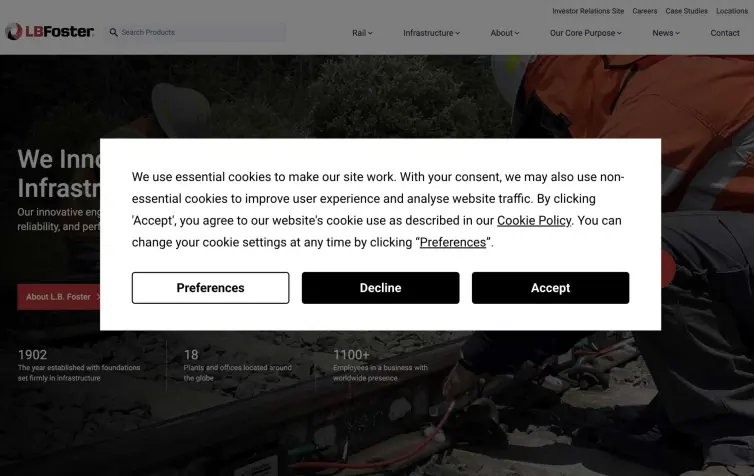
The cookie consent banner as seen by visitors from Europe: Preferences, Decline, and Accept are all presented with equal prominence before any non-essential cookies are set
For visitors from Europe (including the UK, EU, and EEA), Canada, Brazil, and US states with their own consumer privacy laws, the banner operates on an opt-in basis.
Non-essential cookies are blocked until the visitor actively accepts them. These visitors see a Decline button as well as a Preferences button, giving them full control before any tracking begins.
When a visitor clicks Decline, Termly immediately passes that decision to GTM, which prevents analytics, advertising, and marketing tags from firing.
US states
For visitors from US states without specific consumer privacy legislation, or from anywhere else in the world outside the EU and US, the banner operates on an opt-out basis.
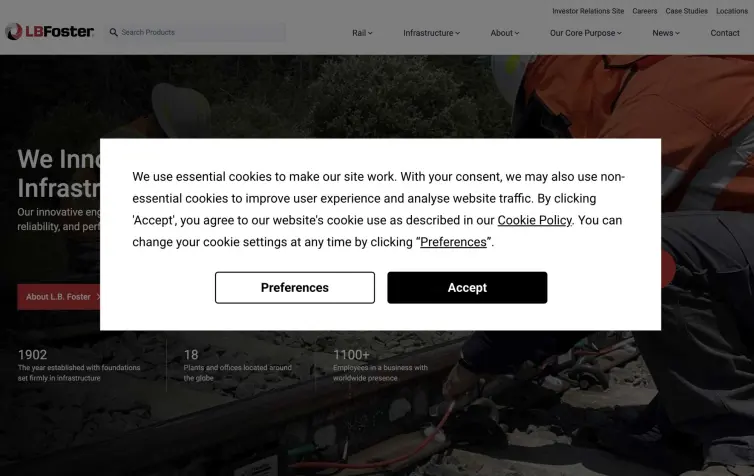
The banner as seen by visitors from US states without consumer privacy legislation: no Decline button is shown, as tracking is permitted by default unless the visitor opts out via Preferences.
Tracking is permitted unless the visitor actively objects. These visitors do not see a Decline button on the banner itself - instead, they can manage their preferences through the preference centre, accessible at any time from the site footer.
Strictly necessary cookies are always allowed
In all cases, strictly necessary cookies continue to function regardless of the visitor's choice. These cover only what is essential for the site to operate - things like session management - and do not involve the collection of personal data.
One technical detail worth noting: declining does not delete cookies already stored in the browser from a previous visit, because cookies sit on the visitor's own device.
What changes immediately is that the associated scripts are blocked from running going forward. For the purposes of UK GDPR and equivalent laws, stopping further processing is what the regulation requires.
Visitors can revisit and update their choices at any time through the preference centre. When preferences change, Termly passes the updated consent state to GTM immediately.
How do we know termly Is working?
Termly maintains a consent log for every visitor interaction with the banner. Each log entry records what choice was made, when it was made, which version of the banner was shown, and the mechanism used (whether via the banner itself or the preference centre). These logs are stored in the Termly dashboard and are accessible at any time.
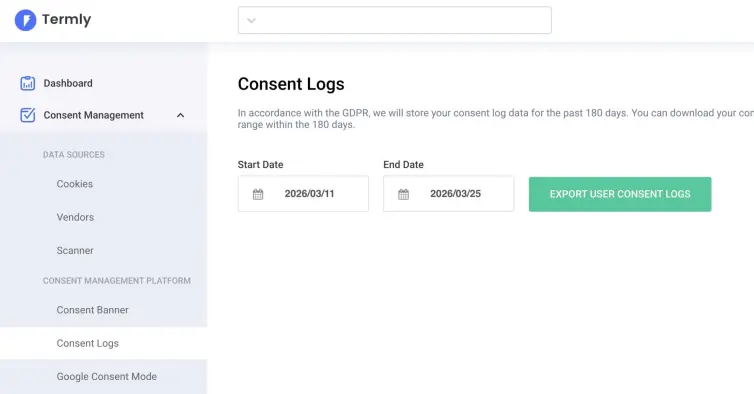
In accordance with the GDPR, Termly will store your consent log data for the past 180 days. You can download your consent log report for any date range within the 180 days.
This audit trail is not just a useful feature - it is a legal requirement. Article 7 of the UK GDPR places the burden of proof on the data controller to demonstrate that valid consent was obtained. Termly's consent logs provide exactly that evidence if a regulator, such as the ICO, ever requests it.
Beyond the logs, the technical architecture of the site provides enforcement. The way I implement Termly, means all third-party scripts are loaded through GTM, and as described above, Termly controls whether each tag is permitted to fire based on the visitor's consent decision.
If someone declines, do third-party cookies still fire?
No. Because all third-party scripts are loaded through GTM, and Termly controls whether each tag fires, analytics, advertising, and marketing tags are blocked when a visitor has declined.
This is an important distinction. Some basic cookie setups display a notice and record a preference but do not technically enforce it - third-party scripts can still fire in the background regardless of what the visitor chose.
The implementation I configure on client sites avoids that problem. There is a single point of control through GTM rather than scripts operating independently of the consent decision.
The result is that a visitor who declines all non-essential cookies will not have analytics, advertising, or marketing tags fire during their session.
In summary
Termly is the consent management platform I use on all client sites to manage cookie compliance. It serves region-appropriate banners based on each visitor's IP address - opt-in for visitors from Europe, Canada, Brazil, and US states with consumer privacy laws; opt-out for everyone else.
Consent decisions are enforced through GTM, and a timestamped consent log is maintained automatically in the Termly dashboard, providing the documentation needed to demonstrate compliance if ever required.
If you have specific questions about how the configuration has been set up for your site, or you would like to review the consent logs together, get in touch and we can walk through it.