
Introducing Sentinel: the Statamic monitoring tool I built for myself, now free for everyone

If you run a Statamic site, here's something most people don't realise. Out of the box, the Control Panel only shows Statamic's own updates. Everything else (npm packages, PHP version, Composer dependencies) lives in the command line.
In fact, depending on how Statamic is configured, most users might not even see the Statamic updates badge.
For a developer, checking it is a trivial task. It's also one that's easy to forget, especially on a site you don't work on every week. For an in-house marketing team or anyone who doesn't open a terminal, it's invisible. They have no way of knowing what's installed, let alone whether something has a critical or high vulnerability that needs fixing today.
I've been running the Statamic Maintenance service for a while now, and the audit step at the start of every monthly update was always the same chore.
Run audit commands for Composer and npm. Check which packages are outdated, which need a version bump, which ones have security vulnerabilities. Write up a quick email report for the client. Useful work. Tedious work, especially as the report part wasn't templated. I wanted a repeatable, one-click solution.
So I built Sentinel
Sentinel is a free Statamic addon that closes that visibility gap. It cross-references your installed Statamic, PHP, Composer and npm versions against the OSV vulnerability database, endoflife.date, the Packagist registry and the npm registry. It shows what it finds inside your Control Panel and keeps a rolling 365-day history of snapshots, so you can see exactly what's moved between any two points in time.
There are two parts to the interface, depending on who's looking. An optional Control Panel widget gives an at-a-glance summary, useful for marketing leads or in-house contacts who just want a green light. A separate utility view goes deeper, aimed at developers, with package health and Laravel, PHP and Statamic versions all in one place.
Then there are the reports
Status Reports. A snapshot of where your site stands right now. Vulnerabilities flagged, packages out of date, end-of-life versions called out. Send it as a one-off, schedule it daily, weekly or monthly, or use it to keep eyes on sites you don't log into very often. It's the report I used to write by hand. For every client.
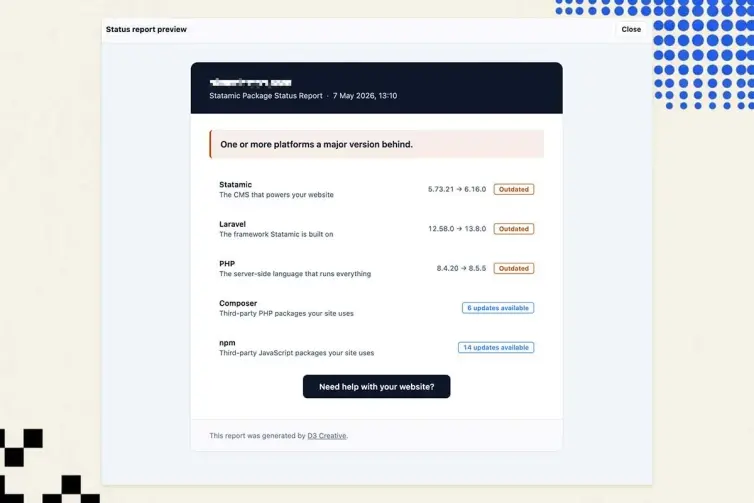
Check what the status report will look like before you send it to a client. The 'Need help with your website' button is optional, so is the branding in the footer. Branding is controlled via environment variables.
Update Reports. A diff. After an update, you can use Sentinel to email clients a clear summary of exactly what moved between the previous snapshot and the new one. There's a preview built in, so you can see what's about to land in the client's inbox before you send it.
There's a paper trail your stakeholders can actually read, and Sentinel keeps a history of every report sent and every package change so you can refer back later.
Both reports are designed to be sent to people who don't live in the Control Panel. Marketing leads, account managers, in-house IT contacts, the business owner or manager who just wants to know their website is updated.
A few other things worth knowing:
It runs on Statamic 3.3, 4, 5 and 6 and PHP 8.0+.
It supports agency branding via environment variables. Useful if you're a freelancer or studio sending these reports under your own name.
It is free, and it stays free. I use it on every site I maintain.
That last point is the honest answer to "why give it away?" Sentinel is the diagnostic layer of the work I already do. I'd rather more Statamic sites had this running than not, including ones I'll never touch.
Install it from the Statamic marketplace.
And if you'd rather not run it yourself…
Sentinel tells you what's wrong. It doesn't fix anything for you. That's not its job.
If you'd like the audits, the updates, the staging tests, and the recovery protocols handled by someone else, that's what my Statamic Maintenance service is for. I run Sentinel on every site in every plan, Core, Plus, and Max, alongside the rest of the stack.

You might also like...
- Statamic Sentinel 3.0
- Statamic 5 security countdown: fixes stop in December 2026
- Darkroom: a Statamic AI image generator for Nano Banana
- Tracer 2.0: my Statamic UTM builder gets site-wide settings
- Statamic 6 security depends on keeping up with releases
- Sentinel 2.3.0: faster scans for my Statamic security addon
- Warming Statamic static cache behind basic auth
- Over 250 installs on: Sentinel and CMS security for Statamic
- Statamic background recache smooths out bulk cache invalidations
- What a software supply chain attack means for your Statamic website